

Every business owner knows automation is important. The problem is not knowing it exists. The problem is knowing where to start. There are dozens of things you could automate, and trying to do all of them at once is the fastest way to do none of them well. The businesses that get real results from automation do not start big. They start smart, picking the right processes first and building from there.
This guide cuts through the noise and tells you exactly which processes to tackle first, why they matter, and what to expect when you do. Whether you are just getting started or looking to expand what you have already built, this list gives you a clear, practical path forward.
What Is Business Process Automation?
Business process automation means using software to handle tasks that your team would otherwise do manually. Instead of someone sending follow-up emails one by one, updating spreadsheets by hand, or chasing invoice payments every month, a tool does it automatically based on rules you set once.
The goal is simple:
- Less time on repetitive work
- Fewer mistakes
- A team that can focus on things that actually need human thinking.
What Are the Initial Steps Before You Start Automating?
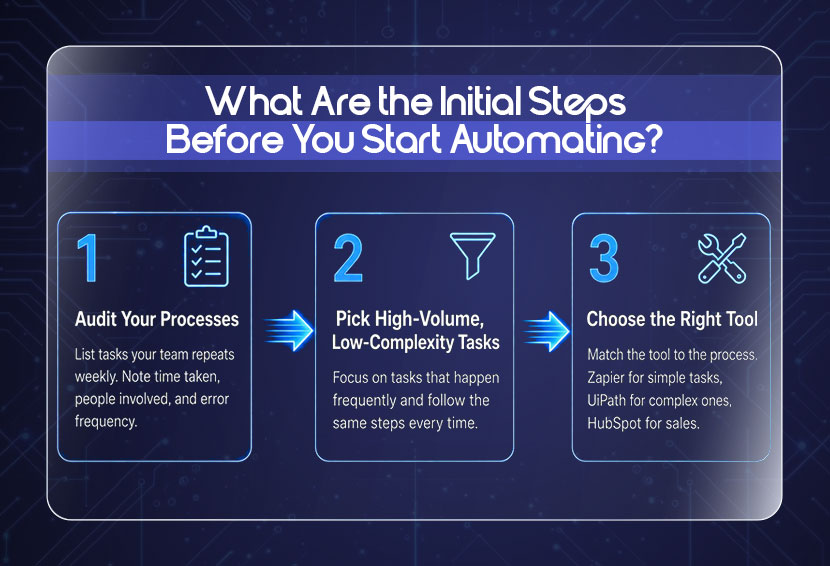
Before you automate anything, you need a clear picture of what you are working with. Start by listing the tasks your team repeats most often, then focus on the ones that are high volume and low complexity. From there, it is just a matter of matching the right tool to the right process.
1. Audit Your Current Processes
Write down the tasks your team does repeatedly every week. Note how long each one takes, how many people are involved, and how often mistakes happen. This is your starting point. You are looking for the tasks with the highest time cost and the most room for error. You can also use the free process rating tool to get a clearer picture of where your biggest gaps are.
2. Pick High-Volume, Low-Complexity Tasks First
The best candidates for processes to automate are tasks that happen frequently and follow the same steps every time. For a first automation project, prioritize predictable, repetitive tasks. Processes involving significant judgment or exceptions usually require more careful design and human oversight.
3. Choose the Right Tool for the Job
There is no single automation tool that does everything well. Zapier and Make are great for connecting apps. UiPath and Automation Anywhere handle more complex robotic process automation. HubSpot and Salesforce cover sales and marketing. n8n is great for creating workflow automations and connecting apps, APIs, and AI models. Match the tool to the process, not the other way around.
Top 10 Business Processes You Should Automate First
The ten processes below are common automation candidates because they are frequent, repetitive, and often tied directly to cost, revenue, or employee capacity. Each one is high-frequency rule-based and directly tied to either cost or revenue, which makes them the strongest starting points for automating business processes. Pick the one that matches your biggest pain point right now and start there. 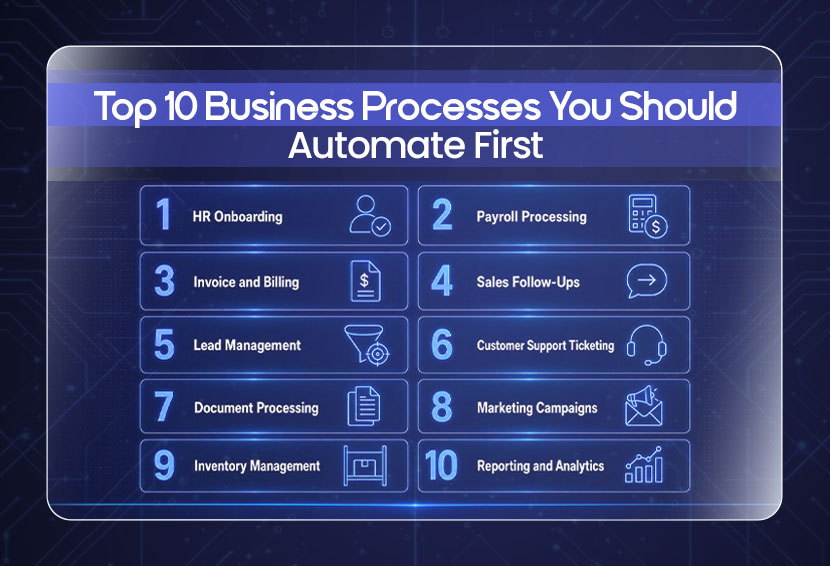
1. HR Onboarding
HR process automation starts here for most businesses,nd for good reason. Onboarding a new hire involves a long chain of steps: sending offer letters, collecting documents, setting up accounts, assigning equipment, and scheduling orientation. Done manually, it takes HR teams hours per hire and is full of steps that get missed.
When you automate onboarding, every new hire triggers a workflow automatically. Documents go out, accounts get created, and the new employee has everything they need before their first day. New employees go through around 54 activities during onboarding. Automating even half of those saves significant time on each new hire. Tools like BambooHR and Rippling handle this well.
2. Payroll Processing
Automate HR payroll, and you eliminate one of the most error-prone, time-consuming tasks in the business. Many payroll steps, like calculating hours, applying deductions, processing payments, and filing tax records, repeat each pay cycle, although exceptions and variable compensation still require appropriate controls. Payroll error rates for manual processing run between 1% and 8%, costing businesses real money in corrections and compliance penalties. Automation handles all of it on schedule, accurately, every time. Gusto and ADP are built exactly for this.
3. Invoice and Billing
Financial process automation around invoicing is one of the highest-impact changes a small business can make. Creating invoices manually, sending them, tracking payments, and following up on overdue accounts, and this is the work that belongs to software, not people. IBM cites estimates placing manual invoice processing at roughly $12.88 to $19.83 per invoice. Automation can reduce that cost to $3 by lowering manual data entry, routing, and follow-up work. Automating it brings that cost down to around $3. Tools like QuickBooks and FreshBooks generate and send invoices automatically, log payments, and send reminders without anyone having to remember to do it.
4. Sales Follow-Ups
Sales process automation is where a lot of revenue is saved. Most leads do not convert on the first contact. They need follow-up, and manual follow-up is inconsistent. Someone gets busy, a lead slips through, and a sale that was close never happens. Salesforce's 2026 sales research reports that reps spend 60% of their time on non-selling tasks such as CRM updates, administrative work, and internal approvals. Automated sequences send the right message at the right time based on what the lead actually did, freeing reps to focus on closing.
5. Lead Management
This is one of the most common BPA use cases because the cost of a mismanaged lead is so high. When a new lead comes in, automation can instantly score it, assign it to the right salesperson, send an intro email, and create a follow-up task all before a human even knows the lead exists. Speed matters here. Companies responding to leads within an hour are seven times more likely to qualify them than those that wait even a little longer.
6. Customer Support Ticketing
Workflow automation for customer support removes the manual sorting and routing that slow down response times. When a customer submits a request, automation logs it, categorizes it by type and urgency, assigns it to the right agent, and sends the customer a confirmation immediately. AI chatbots handle common questions entirely without any human involvement. It has been predicted that chatbots can save businesses up to $8 billion per year in customer service costs in certain industries. Zendesk and Intercom are the go-to tools here.
7. Document Processing
Automation document processing covers generating contracts, routing documents for approval, extracting data from uploaded files, and storing records in the right place. Doing this manually is slow and creates version control problems. McKinsey previously reported that employees spend nearly 20% of their workweek searching for and gathering information, much of which lives in documents. Tools like DocuSign, PandaDoc, and Adobe Acrobat automate the creation, signing, and filing of documents so nothing gets lost and nothing waits longer than it should.
8. Marketing Campaigns
The best marketing automation use cases include email nurture sequences, social media scheduling, audience segmentation, and triggered campaigns based on user behavior. If someone visits your pricing page, they automatically receive a follow-up email. If someone has not engaged in 60 days, a re-engagement campaign goes out without anyone setting it up manually each time. Businesses using marketing automation see a 451% increase in qualified leads. Mailchimp, ActiveCampaign, and HubSpot are the most widely used tools for this.
9. Inventory Management
For product-based businesses, inventory management is a constant balancing act. Too much stock ties up cash. Too little means lost sales. Automation tracks inventory levels in real time or near real time, and triggers reorders when stock drops below a set threshold. Inventory distortion from overstocking and out-of-stocks costs retailers over $1.7 trillion globally each year. Better inventory visibility, forecasting, and replenishment automation can help reduce the risks of overstocking and stockouts. Platforms such as Shopify, Cin7, or dedicated inventory-management systems can automate stock tracking and reorder workflows.
10. Reporting and Analytics
Building weekly and monthly reports manually from multiple data sources is one of the most common time sinks in business operations. Smartsheet found that more than 40% of surveyed workers spend at least a quarter of their workweek on repetitive manual tasks such as email, data collection, and data entry. Automation pulls data from your tools, compiles it, and delivers reports on a set schedule without anyone having to touch a spreadsheet. Google Looker Studio, Databox, and Power BI connect to your existing platforms and generate dashboards automatically.
If you want to understand how business process automation can also reduce your operating costs directly,
Read More: How Can Automation Reduce Operational Costs in Your Business?
A Real-World Workflow Automation Example
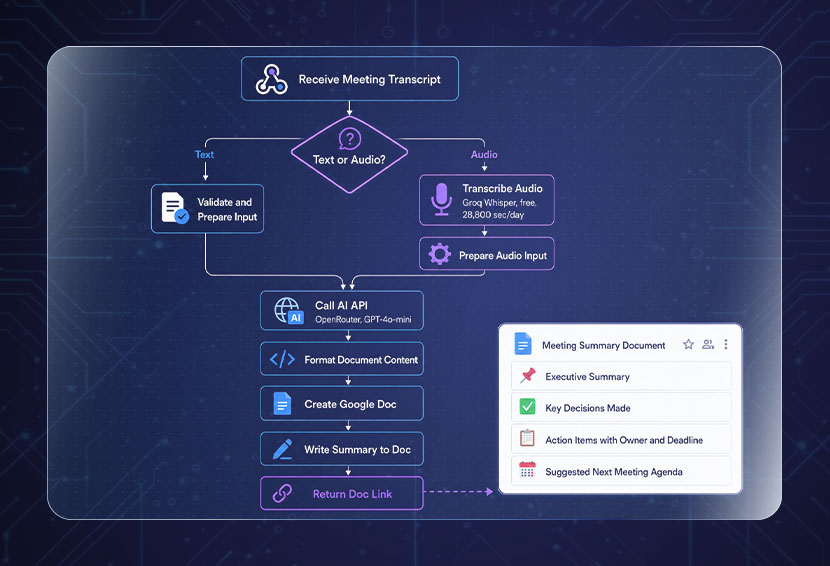
Talking about workflow automation examples is one thing. Seeing one built and live is another. SPCTEK.AI recently published a working automation on n8n that turns raw meeting recordings or transcripts into structured Google Docs summaries automatically, with minimal manual effort. Here is exactly what it does:
- Detects your input automatically: Sends either a text transcript or an audio file, and the workflow figures out which one it is without you specifying
- Transcribes audio instantly: If you send an audio file, Groq Whisper transcribes the audio before the next step runs
- Summarizes with AI: OpenRouter runs the content through an AI model and structures it into clean, usable output
- Creates a formatted Google Doc with four sections: Executive summary, key decisions made, action items with owners and deadlines, and a suggested next meeting agenda
- Returns the doc link instantly: The Google Doc URL comes back to you the moment the workflow finishes.
This is one of the most practical business process automation examples of document processing and AI summarization working together. What used to take an hour of manual note-taking after every meeting now happens in seconds. No copy-pasting, no missed action items, no chasing people for follow-ups.
For teams running multiple meetings a week, this kind of automation document processing adds up fast. You can explore the full workflow here and use it for free on n8n.
How to Prioritize Which Process to Automate First?
Not every task is worth automating. The ones that are worth it happen often, follow consistent steps, take up real time, and do not require judgment calls or creative thinking. McKinsey's 2025 analysis estimates that currently demonstrated technologies could theoretically automate activities representing about 57% of U.S. work hours. The businesses pulling ahead are the ones that have figured out which 45% to go after first.
Before jumping into tools, write down the tasks your team repeats every week. Note how long each one takes, how many people are involved, and how often mistakes happen. If you are unsure where to start, a free process rating tool can help you spot your biggest gaps quickly.
Once you have that list, score each task on three things:
- Time cost: How many hours per week does this take across your team?
- Error rate: How often do mistakes happen, and how much do they cost to fix?
- Frequency: How often does this task repeat daily, weekly, or monthly?
The task with the highest combined score is your starting point. That is the one costing you the most right now and the one where automation will show results the fastest. Start there, get it working well, then move to the next one.
Conclusion
Automating business processes is not about doing everything at once. It is about picking the right starting point and building from there. The ten workflows in this guide are common starting points because many involve repetitive, measurable, rules-based work.
Start with one. Get it running well. Measure the results. Then move to the next. That compounding effect is how businesses build real operational leverage over time. 
FAQs
Q: What is the easiest task to automate?
Email notifications and follow-ups. Basic email notifications and follow-ups can often be configured quickly using no-code tools, although setup and testing time vary by workflow. Invoice sending is a close second since it is low complexity, high frequency, and time savings show up from the very first billing cycle.
Q: Can I automate business processes without technical skills?
Yes. Tools like Zapier, Make, and HubSpot are built for non-technical users. Many basic workflows can be built using no-code interfaces, while complex integrations may require APIs, custom logic, or technical support.
Q: How long does it take to set up business process automation?
Simple workflows may be configured relatively quickly, while multi-system or approval-heavy processes require more time for design, testing, permissions, and exception handling.
Q: Does automation work for very small businesses or solo operators?
Absolutely, in fact, small businesses can benefit the most because every hour saved has a direct impact. Even automating one or two tasks, like scheduling or invoicing, can free up several hours a week.
Q: What happens if an automated workflow breaks or makes an error?
Most automation tools send instant alerts when a workflow fails, so you can catch and fix it quickly. This is why testing before going live and doing regular check-ins on your automations matters.
Q: Is automation expensive to implement for a small business?
Not necessarily. Many tools like Zapier, HubSpot, and Make offer free plans that cover basic automation needs. Paid plans typically start at $20 to $50 per month. Many automation platforms offer free entry-level plans, while paid pricing varies by users, workflow volume, features, and usage. For example, Zapier and Make offer low-cost entry tiers, while more advanced CRM or enterprise automation can cost substantially more.
Weekly Newsletter
Scale Without Operational Chaos
Get weekly actionable insights and AI updates to improve operations and grow with better systems.
2,400+ operators subscribed
Unsubscribe anytime